
mac_gyver
-
Posts
5,537 -
Joined
-
Days Won
192
Everything posted by mac_gyver
-
just to be clear, you are stating that with the echo 'Your roster has been updated ...'; statement in the code and the header() statement commented out, and you are sure the code you are showing us is is the correct and complete code that's being ran on the server, and the rank/crew type is not "Captain" and is not "First Officer", that all you get is a blank page? if so, what does the 'view source' of that blank page in your browser show? also, is there any chance that the blank page you end up on is frontend_login.php or some other page than the one you are showing us the code for? what is the $_SESSION['Code'] value for this case where it isn't working? if is seems like i/we are being skeptical, it's because the symptom you are stating is impossible for the posted code. so, either the code being posted isn't what is being ran or the symptom being reported isn't correct. there's actually a ton of stuff this code is doing that isn't needed and can be greatly simplified, but having nothing to do with the current problem.
-

New to php, can't get a form to email data?
mac_gyver replied to ChrisCCPHP's topic in PHP Coding Help
in order to successfully use the php mail() function (or any of the php functions), you must make use of the documentation for that function. you cannot simply make up, guess, or assume what to do. the mail() function takes at most 5 parameters. the first three parameters - to, subject, and message, are required. the 4th parameter, additional_headers, is generally required since most php installations don't have a default from email address set up or it isn't a valid email address for your account/domain. the 5th parameter, additional_parameters, is rarely used. your use of the mail() function would be throwing php errors about the number of parameters. when larning php, developing php code, or debugging php code, you should have php's error_reporting set to E_ALL and display_errors set to ON to get php to help you by reporting and displaying all the errors it detects. you would also want to temporarily comment out any header() redirects since php also has a setting that's turned on by default, that would prevent you from seeing anything your code or php outputs prior to the redirect. all of those variables, $name,$company,$tel,$address,$city, ... should be going into producing the message parameter, in the $message variable. lastly, these emails are NOT being sent from the person who is filling in the form data. they are being sent from the mail server at your web hosting. the From: mail header must be an email address with a domain that is directly tied to your web hosting or if the domain is not hosted at the same address as your mail server, you must have an SPF DNS record where the domain is hosted at, that says your sending mail server is authorized to send emails for that domain. in either case, you should have a proper SPF DNS record that the receiving mail server can use to verify that the sending mail server matches where the email says it is coming From:. you can put the entered name/email in a Reply-to: header, if you want the ability to hit the reply button in a mail client and use that name/email as the reply to address. if you are doing this for real, you must validate that all the external data is of the expected format and doesn't contain things like valid mail headers, in order to prevent mail header injection, particularly for any values you are putting into the additional_header parameter. -
so, that was a lie. someone took the time to ask you if the spelling and capitalization matched the column name. they didn't do that because they needed practice typing. that was asked because the spelling and capitalization must be correct for your code to work.
-
then the most likely cause would be empty data in that column or data that looks like a html tag (has < > around it) so that it doesn't display anything. are you sure you have data in that column? could you have executed a query that cleared all the user names/set them to empty strings? what does the 'view source' of the output in your browser show?
-
is your database column spelled and capitalized exactly as username ?
-
your error message has changed, because the problem changed. the original error was due to fg_membersite.php, not membersite_config.php. in the first post, the require_once() for membersite_config.php was working. it was the require_once() for fg_membersite.php, inside of membersite_config.php, that wasn't working. the most immediate problem is now the path for membersite_config.php. all the folders in question are inside a folder named gesdocente. you either need to add the gesdocente folder to the absolute path you are making for all the require_once() statements OR you need to make the relative path using two .. for all the require_once() statements. edit: relative paths, anything that starts with a ./ or ../ are relative to the main file that was requested, because when you include/require code into your main file, its scope when it runs is the main file, not where it is stored at on the server.
-
there are three other serious problems with your code - 1) the mysql_ functions are obsolete and have been removed from the latest php version. if you or your web host updates to the latest php version, your code will stop running at all and will need to be rewritten. to avoid wasting time learning obsolete methods that will have to be redo in the near future, you should be using either the PDO or mysqli_ database functions. PDO is the best choice, especially if using prepared queries. 2) your code has little to no protection against sql injection or of special sql characters in the data causing sql errors. the easiest and most constant way of protecting against these problems are to use prepared queries. 3) don't use the GLOBAL keyword to being data into a function. this breaks encapsulation and you might as well not be using functions. you should pass any data into a function as call time parameters.
-
using a unique composite index - http://www.sitepoint.com/use-unique-indexes-mysql-databases/
-
unfortunately the OP didn't actually answer the question that was asked. the problem is most likely because his code/database design allows multiple rows with the same combination of values to be inserted into his database table. your database table needs to enforce uniqueness. you need to define a unique composite index for the (catid1, catid2) columns so that you can only insert one row for any combination of values. you should also give those columns names that indicate their true purpose so that anyone reading the code/query can understand what the values mean.
-
first of all, there's no issue posting code from a programming editor - if (isset($_POST['brand'])) { print "BRAND: " . $brand . "<br />"; } else { print "NOT SET"; } you would need to state how you were attempting to post the code and what sort of problem or error you got in order get help with what was going wrong. i posted the above simply by selecting it (left-button drag over the text) and copying it (right-button. select the copy option) in my editor, then right-button, select the paste option, in the forum post where i wanted it to be placed. the php isset() statement does exactly what its name implies and what the php.net documentation states, it tests if a php variable is set. other than php null values, it doesn't care what's in the variable being tested. if a form has been submitted, any named text, password, textarea, and usually submit form fields, that exist within the form tags will cause the corresponding php $_POST (or $_GET, if using a get method form or a link) variable to be be set, regardless of the value from the form field. only named un-checked check-box and un-selected radio-button form fields, that are part of any form, won't be set when a form has been submitted. to test what's in a php variable, you need to actually test the value in the variable. by definition, all submitted form data are string data. therefore, one method would be to test if a variable is or is not an empty string - if($_POST['brand'] != ''){ // the contents of the variable is not an empty string } else { // the contents of the variable is an empty string } if you want to disallow values that consist entirely of white-space characters, use trim() on the data first. you can also use empty() to perform this test. however, php considers all the following things to be 'empty' - therefore, if a 0 is a valid value for a form field, a "0" would be in the $_POST variable, and it would be considered empty() by php.
-
it's not clear what the issue is. what update are you talking about? you have an UPDATE query, but i suspect you are talking about the INSERTed data or are you talking about just refreshing the page? in general, when asking for help, since we are not sitting there with you, you need to show what result you are getting and at what point you are getting it, and either clearly state or show what is wrong with that result, and also show or state what result you expected to get.
-
when you var_dump the json decoded array, the whole thing if you need to, add echo '<pre>'; before the var_dump() statement so that the output will be human readable. then you need to identify which elements you need from the data. for once-per-order data, you would just access the correct array elements. for repeated data, you would loop over the correct array elements. if you need more specific help, you will need to show us or tell us specifically what elements of the array you need, show us the code you tried, show us what wrong result you got, and what result you expected from that data.
-
you have far too much code, making it hard for you and us to see what the code is supposed to be doing. just some of the problems are - 1) you have several places where you are using data that may not even exist, which will result in errors or incorrect output when it doesn't. if code requires an input value, all the code dependent on that input should only be executed if the input is present. 2) your login check isn't stopping program execution when the visitor isn't logged in. all the code is still running for a non-logged in visitor. 3) you are running queries inside of loops. this is a performance killer. 4) looping over query data where there will be at most one row. this just adds clutter to the code. 5) not using each set of the retrieved data inside of loops. this will typically result in only the last set of data being used after the end of the loop. 6) you have all kinds of variables that you are producing but don't use at all. i recommend laying out the code on your page with the different concerns separated. see the following code layout that will help you do this - http://forums.phpfreaks.com/topic/297824-database-issues-and-working/?do=findComment&comment=1519095 the biggest help will come through separating the get method business logic from the get method presentation logic. this will group all the database dependent code together, allowing you or us to see just what the query/data portion of the code is doing so that it can be simplified.
-
do you have php's error_reporting set to E_ALL and display_errors set to ON so that php would help you by reporting and displaying all the errors it detects? do you have the PDO error mode set to exceptions so that any PDO statement that throws an error would cause an exception so that your main code only has to deal with error free execution of the PDO statements?
-
there's something faulty with your method of learning and programming. you have hundreds and hundreds of forum posts around the web, yet, you don't seem to have learned any of the methods that are being used, that would allow you create (or debug problems with) your own code. each of your posts are missing basic 'how to' building block information that you should have learned along the way. it doesn't even appear like you understand what each of your files are trying to accomplish. if you did, you wouldn't have changed the query in the code that's building the select/option menu. a large amount of generalization, continuity, and consistence is required in programming. you need find a different approach that will allow you to learn the meaning of what you are doing, so that anything you learn can be reused the next time you do something similar.
-
your code doesn't have anything in it to just send to one selected phone number. you are querying for and looping over all the `repairs` db table data in the second piece of code. 1) your select/option menu should use the id as the value that will be submitted. not the customer phone number. this will make it easier to validate the submitted data. 2) you would use the submitted id to query for the actual phone number, then retrieve just that single row to get the phone number. 3) why are you even looping in the second piece of code? 4) do you have any security in place to control who can access either of the two pages you have shown? as it stands now, anyone who can visit these pages can cause a message to be sent to any phone number stored in your data. are you even looking at your code? the computer can only do what the code you write tells it to do. if you are querying for the wrong data, in this case all the data, and looping over data, when you should be fetching at most one row, that's on you.
-
someone, or a bot script, probably gained access to your account., especially if you used a common or weak password or you use the same password everywhere on the web and an account that didn't properly hash the stored passwords has been compromised. there are other possibilities, such as someone managing to reset your password, which would allow them to gain access to your account, but if you were able to log in to your account using your existing password without any problems, that isn't the case. or perhaps you have remained logged in since your last real activity on the forum and your computer/browser/network has been compromised and someone got the 'remember me' cookie value and was able to impersonate you on the forum.
-
php is a server-side scripting language. ALL THE PHP CODE YOU HAVE ON THE PAGE RUNS WHEN THE PAGE GETS REQUESTED. javascript is a client-side scripting language. by the time any of it runs, the php code has long since finished running. the ajax request would need to submit the form data to the url of a .php page that contains php code to call to the sendemailfn() function and then output the value returned from the function back to the client-side code as a response to the ajax request. since using ajax to submit form data to a php page is a common task, i recommend that you read through some web based tutorials to see how to do this.
-
then, i know of a third help forum, with two shorter threads for this problem, filled with replies listing what's wrong with the current randomly thrown together code, and what the code needs to be doing, with a working pdo example that matches the form data, that could have been followed, but wasn't. nor was the advice that was given that the OP needed to actually learn the meaning of what he is doing in order to successfully write any code. resulting in no one continuing to post replies. if the OP revisits this thread, you cannot program by mimicking things you have seen posted on the web. randomly putting pieces of code together will take an infinite amount of time to come up with code that does something. repeatedly asking someone else to look at your randomly changing 'moving target' of code will quickly loose the free help, because no one likes to see their volunteered time go to waste. you need to first go and learn the basics of the php language, so that you will know what an if(){} conditional statement, that encloses multiple statements, even looks like.
-
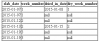
one single query would look more like this - SELECT Count(l.lot_id) AS slab_count, WEEK (l.slab_date) AS week_number FROM lot l LEFT JOIN block AS b ON l.block_id = b.block_id LEFT JOIN community AS c ON b.community_id = c.community_id WHERE YEAR(l.slab_date) = 2015 AND (c.contract_type_id = 1 OR c.contract_type_id= 3) GROUP BY week_number however, i/we don't know what your rules are concerning how the dried_in_date should factor into the result. the query you showed doesn't produce the result you want, therefore it doesn't show us the correct rules for the value. the following is the same basic query as above without the GROUP BY - SELECT l.slab_date, WEEK (l.slab_date) AS week_number, l.dried_in_date, WEEK (l.dried_in_date) AS dry_week_number FROM lot l LEFT JOIN block AS b ON l.block_id = b.block_id LEFT JOIN community AS c ON b.community_id = c.community_id WHERE YEAR(l.slab_date) = 2015 AND (c.contract_type_id = 1 OR c.contract_type_id= 3) ORDER BY week_number it produces this result from your data - so, from that, how do you get your desired slab count of 2,1,2 for week 1,2,3?
-
Fetching table info based on array values
mac_gyver replied to lquidsilver's topic in PHP Coding Help
implode the array into a list, with a comma as the separator character, then use that comma separated list in an IN() comparison in a WHERE clause in your query. ref: http://php.net/implode http://dev.mysql.com/doc/refman/5.7/en/comparison-operators.html#function_in are these values coming from external data and would need to be properly validated, cast, or put into a prepared query to prevent sql injection? -
Parse error: syntax error, unexpected 'exit' (T_EXIT)
mac_gyver replied to chiranjiv's topic in PHP Coding Help
neither the {} around the exit or () on the end of exit are required, nor does the lack of them throw a syntax error. since the error gives line 1 as where the problem is being detected at and there's no statement on line 1, either this isn't the actual code the error is referring to or there's something going on with the file's character encoding or a broken php installation that's causing the problem. -
your code contains two logic problems. 1) if(!$query) - this condition means that the query failed with an error of some kind (sql syntax error, wrong table or column name.) it does not mean that the username/password was invalid. your code should actually be using exceptions to handle database errors so that the main program logic only has to deal with the non-error conditions. 2) your code creates an instance of the user class in $_SESSION['user'] any time the User::sign_in() method gets called, regardless of the username/password matching anything. any request to the page after that will result in $_SESSION['user'] being set. your user class needs a property or method you can use in your code to determine the logged in state.
-
is your code echoing the $output variable?
-
each page request must actively enforce access security for the page. the "classroom sourcecode" would only be output, using php code, to a visitor if that visitor is logged in and has permission to access one instance of that content. you would only have one 'classroom' .php page. you would need a database table that holds the students that have been assigned to an instance of a classroom. for historical data reasons, you should keep any past records in the table and have a 'status' column that you can use to mark records with an 'active' status. if the limit is 5 students, you would need to insure that there are only 5 students listed as being active at one time. if it is the teacher(s) that assign a student to a classroom, a logged in teacher would need a way of picking from all the unassigned students and if there is an available instance of a classroom, can add a record to the database table with an active status, with the selected student's id. the table would also have a column with the teacher's id, used both to list the teacher and to limit who 'owns' the record and can alter the status column. one would assume that the same teacher (or an administrator) would have permission to remove a student from a classroom, by changing the status from active to some other value. this would free up one of the available classrooms. if a student is logged in and has a record in the database table with his id and an active status, when he visits the one single .php 'classroom' page, he will be able to view the content. any one who isn't logged in or doesn't have a record with an active status, would not be able to view the content. you would either just output a message or redirect them somewhere else.