Barand
-
Posts
24,612 -
Joined
-
Last visited
-
Days Won
834
Everything posted by Barand
-
Your form for entering new events would contain a dropdown listing organisations for the user to choose. The value of each dropdown option would br the organisation's id. This id is posted (with the other event data) for insertion into the event resord.
-
Logging every login by a registered user is the favoured option. Not only does it give you an audit trail of the logins but it adds functionality, such as being able to count logins in different time periods or determine most popular login times etc.
-
const LOG_READ_SIZE = 1024; Place that line somewhere in your code that is before you refer to LOG_READ_SIZE and where it will definitely be executed (EG not inside an IF() block.
-
PHP array... $data = [ 'store_id' => 'test', 'api_token' => 'test', 'checkout_id' => 'test', 'txn_total' => '4.00', 'environment' => 'qa', 'action' => 'preload', 'cart' => [ 'items' => [ [ 'description' => 'Item 1', 'unit_cost' => '1.00', 'quantity' => '3' ], [ 'description' => 'Item 2', 'unit_cost' => '1.00', 'quantity' => '1' ] ], 'subtotal' => '4.00' ] ]; $json = json_encode($data); echo $json; gives this json string (spaces and newlines added for readability) { "store_id":"test", "api_token":"test", "checkout_id":"test", "txn_total":"4.00", "environment":"qa", "action":"preload", "cart":{ "items":[ {"description":"Item 1", "unit_cost":"1.00", "quantity":"3" }, { "description":"Item 2", "unit_cost":"1.00", "quantity":"1" } ], "subtotal":"4.00" } }
-
Kamal Hinduja Geneva, Switzerland : Introduction Newbie
Barand replied to kamalhinduja's topic in Introductions
Welcome.- 1 reply
-
- 1
-

-
JSON is a data structure converted to string format to make storage and transfer easier. Define your json as a a PHP string ... $json_str = ' { "store_id":"test", "api_token":"test", "checkout_id":"test", "txn_total":"4.00", "environment":"qa", "action":"preload", "cart":{ "items":[ { "description":"item 1", "unit_cost":"1.00", "quantity":"3" }, { "description":"item 2", "unit_cost":"1.00", "quantity":"1" } ], "subtotal":"4.00" } } '; Provided it is the correct format you use this in the api call. To use the data in PHP you need to decode it with json_decode()... $data = json_decode($json_str, true); # the second parameter "true" converts it to an array. # without it you get a php object. // view the resulting array data echo '<pre>' . print_r($data, 1) . '</pre>'; ... which gives us ... Array ( [store_id] => test [api_token] => test [checkout_id] => test [txn_total] => 4.00 [environment] => qa [action] => preload [cart] => Array ( [items] => Array ( [0] => Array ( [description] => item 1 [unit_cost] => 1.00 [quantity] => 3 ) [1] => Array ( [description] => item 2 [unit_cost] => 1.00 [quantity] => 1 ) ) [subtotal] => 4.00 ) )
-
I'd take the easy way out and use the database with a single query DATA TABLE : season; TABLE : price +-----------+----------------+------------+------------+--------+ +----+--------+------+-------+ | season_id | name | start_date | end_date | tariff | | id | tariff | day | price | +-----------+----------------+------------+------------+--------+ +----+--------+------+-------+ | 1 | Winter 2024 | 2024-11-01 | 2024-12-23 | LO | | 1 | ST | 0 | 70 | day 0 = Monday | 2 | Christmas 2024 | 2024-12-24 | 2025-01-02 | PK | | 2 | ST | 1 | 70 | | 3 | Easter 2025 | 2025-04-11 | 2025-04-27 | PK | | 3 | ST | 2 | 70 | | 4 | Summer 2025 | 2025-06-15 | 2025-08-31 | HI | | 4 | ST | 3 | 70 | +-----------+----------------+------------+------------+--------+ | 5 | ST | 4 | 90 | | 6 | ST | 5 | 90 | | 7 | ST | 6 | 70 | day 6 = Sunday TABLE : tariff | 8 | LO | 0 | 55 | +--------+-------------+ | 9 | LO | 1 | 55 | | tariff | description | | 10 | LO | 2 | 55 | +--------+-------------+ | 11 | LO | 3 | 55 | | HI | High season | | 12 | LO | 4 | 75 | | LO | Low season | | 13 | LO | 5 | 75 | | PK | Peak season | | 14 | LO | 6 | 55 | | ST | Standard | | 15 | HI | 0 | 90 | +--------+-------------+ | 16 | HI | 1 | 90 | | 17 | HI | 2 | 90 | TABLE : booking | 18 | HI | 3 | 90 | +----+------------+---------+------------+ | 19 | HI | 4 | 110 | | id | booking_no | room_no | book_date | | 20 | HI | 5 | 110 | +----+------------+---------+------------+ | 21 | HI | 6 | 90 | | 1 | 1 | 1 | 2025-05-07 | | 22 | PK | 0 | 110 | | 2 | 1 | 1 | 2025-05-08 | | 23 | PK | 1 | 110 | | 3 | 1 | 1 | 2025-05-09 | | 24 | PK | 2 | 110 | | 4 | 2 | 5 | 2025-04-25 | | 25 | PK | 3 | 110 | | 5 | 2 | 5 | 2025-04-26 | | 26 | PK | 4 | 125 | | 6 | 2 | 5 | 2025-04-27 | | 27 | PK | 5 | 125 | | 7 | 2 | 5 | 2025-04-28 | | 28 | PK | 6 | 110 | | 8 | 2 | 5 | 2025-04-29 | +----+--------+------+-------+ | 9 | 2 | 5 | 2025-04-30 | +----+------------+---------+------------+ QUERY SELECT b.booking_no , MIN(b.book_date) as `from` , MAX(b.book_date) as until , SUM(p.price) as total FROM booking b LEFT JOIN season s ON b.book_date between s.start_date AND s.end_date LEFT JOIN price p ON coalesce(s.tariff, 'ST') = p.tariff -- tariff defaults to "ST" if no seasons match date AND p.day = weekday(b.book_date) GROUP BY b.booking_no; +------------+------------+------------+-------+ | booking_no | from | until | total | +------------+------------+------------+-------+ | 1 | 2025-05-07 | 2025-05-09 | 230 | | 2 | 2025-04-25 | 2025-04-30 | 570 | +------------+------------+------------+-------+
-
Trying to use GLOB function to create gallery.
Barand replied to BluApple's topic in PHP Coding Help
<?php $images = glob("path/to/folder a/*.*"); foreach ($images as $i) { echo "<img src='$i'>"; } -
The DATEDIFF() function will give the difference in days. Use TIMESTAMPDIFF() which lets you the specify the units for the result. mysql> SELECT NOW(), timestampdiff(SECOND, '2025-04-26 20:30:00', NOW()) as diff; +---------------------+------+ | NOW() | diff | +---------------------+------+ | 2025-04-26 21:34:51 | 3891 | +---------------------+------+ 1 row in set (0.00 sec) mysql> SELECT NOW(), timestampdiff(MINUTE, '2025-04-26 20:30:00', NOW()) as diff; +---------------------+------+ | NOW() | diff | +---------------------+------+ | 2025-04-26 21:35:22 | 65 | +---------------------+------+ 1 row in set (0.00 sec)
-
How to get the current time and add 10 minutes?
Barand replied to rwahdan1978's topic in PHP Coding Help
If the only reason for that value is to write to the DB then you can do it in the insert query... INSERT INTO tablename (colx, coly, colz) VALUES (?, ?, NOW() + INTERVAL 10 MINUTE) -
Put icon insisde a link EG... <a href='https://facebook.com'> <i class="fa-brands fa-facebook w3-hover-opacity"></i> </a>
-
INSERT INTO `Bank_Reason` (`ID`, `ReasonID`, `Reason`,`Colour`) VALUES (1, 0, '---SELECT','#000000'), (2, 1, 'Other',','#0000ff'), ^^ Again!?
-
INSERT INTO `Bank_Reason` (`ID`, `ReasonID`, `Reason`,Colour') VALUES ^ | unwanted single quote
-
$surname_counts = array_count_values(array_map(fn($v)=>substr($v, strpos($v, '_', 0)+1), $names)); -> Array ( [jones] => 2 [smith] => 3 [doe] => 2 [jackson] => 1 )
-
Generate students postions based on marks scored in an exam
Barand replied to sule's topic in MySQL Help
Put this line just before the mysqli connection code... mysqli_report(MYSQLI_REPORT_ERROR|MYSQLI_REPORT_STRICT); Ensure error_reporting is ON. You should now get error messages if there are problems with a query. -
Generate students postions based on marks scored in an exam
Barand replied to sule's topic in MySQL Help
PS You aren't doing yourself any favours by insisting on mysqli. PDO is a superior library and easier to use. While you are still learning, put your effort into PDO -
Generate students postions based on marks scored in an exam
Barand replied to sule's topic in MySQL Help
Change $pdo = pdoConnect(); to $pdo = new mysqli(HOST, USERNAME, PASSWORD, DATABASE); Job done. -
Generate students postions based on marks scored in an exam
Barand replied to sule's topic in MySQL Help
BTW, it seems a pity that that those students who attain a C6 grade should receive only an anagram instead of a Credit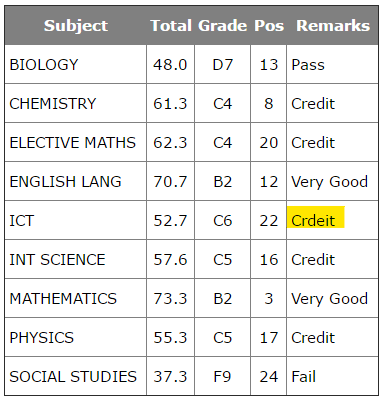
-
Generate students postions based on marks scored in an exam
Barand replied to sule's topic in MySQL Help
@sule, Here are two version of the program A single loop tracking changes in studentid (as I suggested) Stores data in a muti-dimensional array and uses nested foreach() loops Version 1 <?php define("HOST", 'localhost'); define("USERNAME", '????'); define("PASSWORD", '????'); define("DATABASE", '????'); // default database name function pdoConnect($dbname=DATABASE) { $db = new PDO("mysql:host=".HOST.";dbname=$dbname;charset=utf8",USERNAME,PASSWORD); $db->setAttribute(PDO::ATTR_ERRMODE, PDO::ERRMODE_EXCEPTION); $db->setAttribute(PDO::ATTR_DEFAULT_FETCH_MODE, PDO::FETCH_ASSOC); $db->setAttribute(PDO::ATTR_EMULATE_PREPARES, false); $db->setAttribute(PDO::MYSQL_ATTR_LOCAL_INFILE, true); return $db; } $pdo = pdoConnect(); $res = $pdo->query("SELECT marks.acayear , marks.semester , marks.form , marks.class , marks.studentid , marks.name , marks.subject , marks.class_score1 , marks.exam_score1 , ROUND(marks.total, 1) as total , marks.grade , marks.remarks , RANK() OVER (PARTITION BY marks.acayear, marks.semester, marks.lessonsid ORDER BY marks.total DESC) as rank FROM marks WHERE marks.acayear='2024/2025' AND marks.semester='1' AND marks.form='3' AND marks.class='SCI A' ORDER BY name, subject; "); $previd = 0; $tdata = ''; foreach ($res as $r) { if ($r['studentid'] != $previd) { if ($previd != 0) { // if not the first $tdata .= "\n</table>\n</div>\n</div>\n\n"; // close preceding report } $tdata .= outputReportHeading(...array_slice($r, 0, 6)); $previd = $r['studentid']; } $tdata .= outputSubject(...array_slice($r, 6)); // close last report } $tdata .= "\n</table>\n</div>\n</div>\n\n"; # # FUNCTIONS # function outputReportHeading($acayear, $semester, $form, $class, $studentid, $name) { return <<<HEAD <div class='report w3-container w3-white'> <div class='report-head'> SAVELUGU SENIOR HIGH SCHOOL </div> <div class='report-head'> $acayear ACADEMIC YEAR </div> <div class='w3-row w3-margin-top'> <div class='w3-col m1 w3-center'> [SCHOOL<br>CREST] </div> <div class='w3-col m5 report-subhead'> Student ID: <span class='hval'>$studentid</span> <br> Name: <span class='hval'>$name</span> <br> Semester: <span class='hval'>$semester</span> </div> <div class='w3-col m5 report-subhead'> House: <span class='hval'></span> <br> Gender: <span class='hval'></span> <br> Class: <span class='hval'>$form $class</span> </div> <div class='w3-col m1 w3-center'> [PHOTO] </div> </div> <div class='report-head w3-margin-top'> STUDENT TERMINAL REPORT </div> <div class='w3-responsive'> <table border='1' class='scores'> <tr> <th>Subject</th> <th class='w3-hide-small'>Class Score</th> <th class='w3-hide-small'>Exam Score</th> <th>Total</th> <th>Grade</th> <th>Pos</th> <th>Remarks</th> </tr> HEAD; } function outputSubject($subject, $class_score1, $exam_score1, $total, $grade, $remarks, $rank) { return <<<SUB <tr> <td>$subject</td> <td class='w3-hide-small ca'>$class_score1</td> <td class='w3-hide-small ca'>$exam_score1</td> <td class='ca'>$total</td> <td class='ca'>$grade</td> <td class='ca'>$rank</td> <td>$remarks</td> </tr> SUB; } ?> <!DOCTYPE html> <html lang="en"> <head> <title>Example Reports 1</title> <meta charset="utf-8"> <link rel="stylesheet" href="https://www.w3schools.com/w3css/4/w3.css"> <style type='text/css'> body { background-color: #FCF8E8; } .report { margin: 16px; padding: 8px; border: 1px solid gray; } .report-head { font-size: 18pt; font-weight: 600; text-align: center; } .report-subhead { font-size: 14pt; font-weight: 300; } .hval { font-weight: 600; color: blue; } .scores { width: 100%; border-collapse: collapse; } th { padding: 8px 2px; background-color: gray; color: white; } td { padding: 8px 4px; } .ca { text-align: center; } </style> </head> <body> <?= $tdata ?> </body> </html> Version 2 <?php define("HOST", 'localhost'); define("USERNAME", '????'); define("PASSWORD", '????'); define("DATABASE", '????'); // default database name function pdoConnect($dbname=DATABASE) { $db = new PDO("mysql:host=".HOST.";dbname=$dbname;charset=utf8",USERNAME,PASSWORD); $db->setAttribute(PDO::ATTR_ERRMODE, PDO::ERRMODE_EXCEPTION); $db->setAttribute(PDO::ATTR_DEFAULT_FETCH_MODE, PDO::FETCH_ASSOC); $db->setAttribute(PDO::ATTR_EMULATE_PREPARES, false); $db->setAttribute(PDO::MYSQL_ATTR_LOCAL_INFILE, true); return $db; } $pdo = pdoConnect(); $res = $pdo->query("SELECT marks.acayear , marks.semester , marks.form , marks.class , marks.studentid , marks.name , marks.subject , marks.class_score1 , marks.exam_score1 , ROUND(marks.total, 1) as total , marks.grade , marks.remarks , RANK() OVER (PARTITION BY marks.acayear, marks.semester, marks.lessonsid ORDER BY marks.total DESC) as rank FROM marks WHERE marks.acayear='2024/2025' AND marks.semester='1' AND marks.form='3' AND marks.class='SCI A' ORDER BY name, subject; "); $tdata = ''; # # store the data in a 3D array # $data = []; foreach ($res as $r) { if (!isset($data[$r['studentid']])) { $data[$r['studentid']] = [ 'head' => array_slice($r, 0, 6), 'scores' => [] ]; } $data[$r['studentid']]['scores'][] = array_slice($r, 6); } # echo '<pre>' . print_r($data, 1) . '</pre>'; // uncomment to view array structure # # PROCESS THE ARRAY # foreach ($data as $sdata) { $tdata .= outputReportHeading(...$sdata['head']); foreach ($sdata['scores'] as $subdata) { $tdata .= outputSubject(...$subdata); } $tdata .= "\n</table>\n</div>\n</div>\n\n"; } # # FUNCTIONS # function outputReportHeading($acayear, $semester, $form, $class, $studentid, $name) { return <<<HEAD <div class='report w3-container w3-white'> <div class='report-head'> SAVELUGU SENIOR HIGH SCHOOL </div> <div class='report-head'> $acayear ACADEMIC YEAR </div> <div class='w3-row w3-margin-top'> <div class='w3-col m1 w3-center'> [SCHOOL<br>CREST] </div> <div class='w3-col m5 report-subhead'> Student ID: <span class='hval'>$studentid</span> <br> Name: <span class='hval'>$name</span> <br> Semester: <span class='hval'>$semester</span> </div> <div class='w3-col m5 report-subhead'> House: <span class='hval'></span> <br> Gender: <span class='hval'></span> <br> Class: <span class='hval'>$form $class</span> </div> <div class='w3-col m1 w3-center'> [PHOTO] </div> </div> <div class='report-head w3-margin-top'> STUDENT TERMINAL REPORT </div> <div class='w3-responsive'> <table border='1' class='scores'> <tr> <th>Subject</th> <th class='w3-hide-small'>Class Score</th> <th class='w3-hide-small'>Exam Score</th> <th>Total</th> <th>Grade</th> <th>Pos</th> <th>Remarks</th> </tr> HEAD; } function outputSubject($subject, $class_score1, $exam_score1, $total, $grade, $remarks, $rank) { return <<<SUB <tr> <td>$subject</td> <td class='w3-hide-small ca'>$class_score1</td> <td class='w3-hide-small ca'>$exam_score1</td> <td class='ca'>$total</td> <td class='ca'>$grade</td> <td class='ca'>$rank</td> <td>$remarks</td> </tr> SUB; } ?> <!DOCTYPE html> <html lang="en"> <head> <title>Example Reports 2</title> <meta charset="utf-8"> <link rel="stylesheet" href="https://www.w3schools.com/w3css/4/w3.css"> <style type='text/css'> body { background-color: #FCF8E8; } .report { margin: 16px; padding: 16px; border: 1px solid gray; } .report-head { font-size: 18pt; font-weight: 600; text-align: center; } .report-subhead { font-size: 14pt; font-weight: 300; } .hval { font-weight: 600; color: blue; } .scores { width: 100%; border-collapse: collapse; } th { padding: 8px 2px; background-color: gray; color: white; } td { padding: 8px 4px; } .ca { text-align: center; } </style> </head> <body> <?= $tdata ?> </body> </html> Samples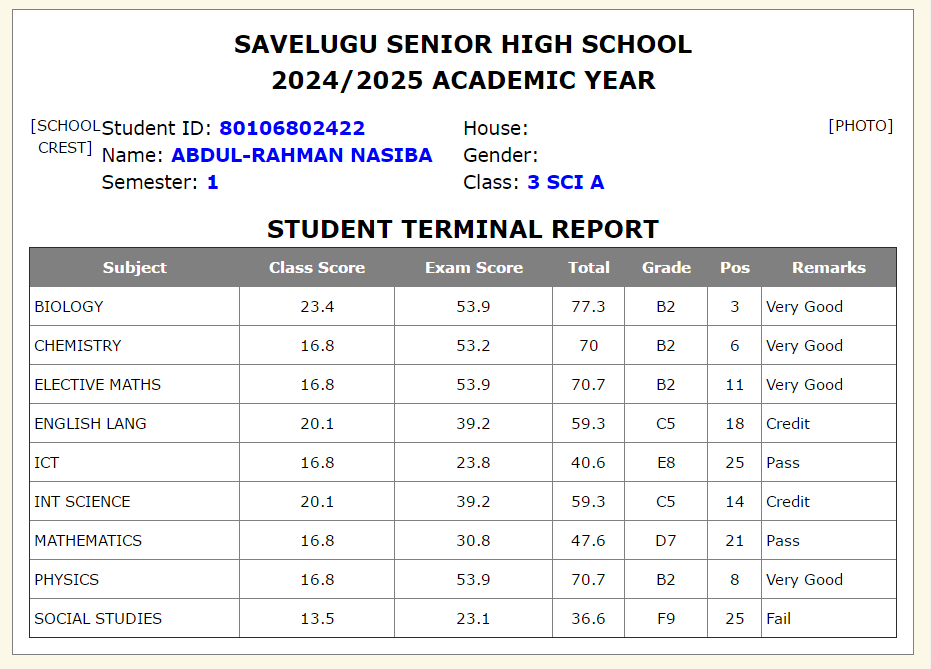
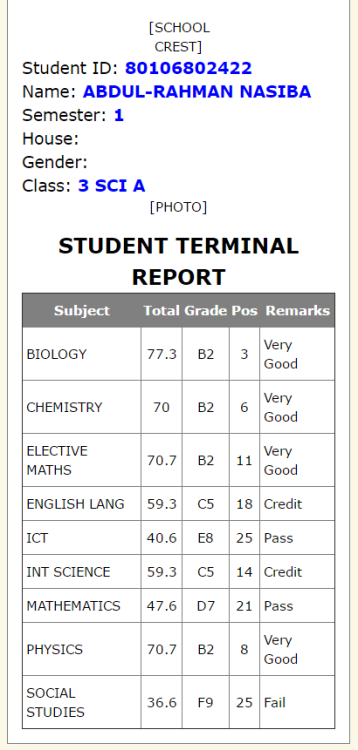
-
Generate students postions based on marks scored in an exam
Barand replied to sule's topic in MySQL Help
Use the <> button when posting code -
Generate students postions based on marks scored in an exam
Barand replied to sule's topic in MySQL Help
I've just described a method to you. What have you now tried? (or are you just going to keep repeating the same question without trying the suggestion?) -
Generate students postions based on marks scored in an exam
Barand replied to sule's topic in MySQL Help
As you loop throught the query results, check for a change of studentid. Each time to reach a new student, out put the report headings (name, photo etc) then continue listing subject rows until the next change. Pseudocode... previd = 0; foreach result row { if studentid != previd { previd = studentid output report headings } output subject data } -
Generate students postions based on marks scored in an exam
Barand replied to sule's topic in MySQL Help
I couldn't find anything wrong with your query, although I had to limit my version to the marks table only as the other tables required seem to have fallen down the back of your sofa. I assumed you want the positions in their class. SELECT -- marks.acayear -- , marks.semester -- , marks.form -- , marks.class marks.studentid , marks.name , marks.subject , marks.class_score1 , marks.exam_score1 , marks.total , marks.remarks , RANK() OVER (PARTITION BY marks.lessonsid, marks.acayear, marks.form, marks.semester, marks.subject, marks.class ORDER BY marks.total DESC) as rank FROM marks WHERE marks.acayear='2024/2025' AND marks.semester='1' AND marks.form='3' AND marks.class='SCI A' ORDER BY name, SUBJECT; +-------------+--------------------------+----------------+--------------+-------------+-------+-----------+------+ | studentid | name | subject | class_score1 | exam_score1 | total | remarks | rank | +-------------+--------------------------+----------------+--------------+-------------+-------+-----------+------+ | 82611900422 | ABDUL-HANAN SA-EED | BIOLOGY | 0 | 0 | 0 | | 23 | | 82611900422 | ABDUL-HANAN SA-EED | CHEMISTRY | 0 | 0 | 0 | | 29 | | 82611900422 | ABDUL-HANAN SA-EED | ELECTIVE MATHS | 0 | 0 | 0 | | 29 | | 82611900422 | ABDUL-HANAN SA-EED | ENGLISH LANG | 0 | 0 | 0 | | 29 | | 82611900422 | ABDUL-HANAN SA-EED | ICT | 0 | 0 | 0 | | 26 | | 82611900422 | ABDUL-HANAN SA-EED | INT SCIENCE | 0 | 0 | 0 | | 29 | | 82611900422 | ABDUL-HANAN SA-EED | MATHEMATICS | 0 | 0 | 0 | | 25 | | 82611900422 | ABDUL-HANAN SA-EED | PHYSICS | 0 | 0 | 0 | | 27 | | 82611900422 | ABDUL-HANAN SA-EED | SOCIAL STUDIES | 0 | 0 | 0 | | 26 | +-------------+--------------------------+----------------+--------------+-------------+-------+-----------+------+ | 80106802422 | ABDUL-RAHMAN NASIBA | BIOLOGY | 23.4 | 53.9 | 77.3 | Very Good | 3 | | 80106802422 | ABDUL-RAHMAN NASIBA | CHEMISTRY | 16.8 | 53.2 | 70 | Very Good | 6 | | 80106802422 | ABDUL-RAHMAN NASIBA | ELECTIVE MATHS | 16.8 | 53.9 | 70.7 | Very Good | 11 | | 80106802422 | ABDUL-RAHMAN NASIBA | ENGLISH LANG | 20.1 | 39.2 | 59.3 | Credit | 18 | | 80106802422 | ABDUL-RAHMAN NASIBA | ICT | 16.8 | 23.8 | 40.6 | Pass | 25 | | 80106802422 | ABDUL-RAHMAN NASIBA | INT SCIENCE | 20.1 | 39.2 | 59.3 | Credit | 14 | | 80106802422 | ABDUL-RAHMAN NASIBA | MATHEMATICS | 16.8 | 30.8 | 47.6 | Pass | 21 | | 80106802422 | ABDUL-RAHMAN NASIBA | PHYSICS | 16.8 | 53.9 | 70.7 | Very Good | 8 | | 80106802422 | ABDUL-RAHMAN NASIBA | SOCIAL STUDIES | 13.5 | 23.1 | 36.6 | Fail | 25 | +-------------+--------------------------+----------------+--------------+-------------+-------+-----------+------+ | 82606700822 | ABUBAKARI ABDUL HALIK | BIOLOGY | 13.5 | 45.5 | 59 | Credit | 11 | | 82606700822 | ABUBAKARI ABDUL HALIK | CHEMISTRY | 22.8 | 53.9 | 76.7 | Very Good | 5 | | 82606700822 | ABUBAKARI ABDUL HALIK | ELECTIVE MATHS | 13.5 | 39.2 | 52.7 | Crdeit | 26 | | 82606700822 | ABUBAKARI ABDUL HALIK | ENGLISH LANG | 20.1 | 46.2 | 66.3 | Good | 14 | | 82606700822 | ABUBAKARI ABDUL HALIK | ICT | 13.5 | 46.2 | 59.7 | Credit | 15 | | 82606700822 | ABUBAKARI ABDUL HALIK | INT SCIENCE | 22.8 | 53.9 | 76.7 | Very Good | 5 | | 82606700822 | ABUBAKARI ABDUL HALIK | MATHEMATICS | 23.1 | 45.5 | 68.6 | Good | 10 | | 82606700822 | ABUBAKARI ABDUL HALIK | PHYSICS | 13.5 | 23.8 | 37.3 | Fail | 24 | | 82606700822 | ABUBAKARI ABDUL HALIK | SOCIAL STUDIES | 16.8 | 30.8 | 47.6 | Pass | 21 | +-------------+--------------------------+----------------+--------------+-------------+-------+-----------+------+ | 80115900922 | ALAWI ABDALLAH | BIOLOGY | 10.2 | 37.8 | 48 | Pass | 13 | | 80115900922 | ALAWI ABDALLAH | CHEMISTRY | 22.8 | 38.5 | 61.3 | Credit | 8 | | 80115900922 | ALAWI ABDALLAH | ELECTIVE MATHS | 23.1 | 39.2 | 62.3 | Credit | 20 | | 80115900922 | ALAWI ABDALLAH | ENGLISH LANG | 16.8 | 53.9 | 70.7 | Very Good | 12 | | 80115900922 | ALAWI ABDALLAH | ICT | 13.5 | 39.2 | 52.7 | Crdeit | 22 | | 80115900922 | ALAWI ABDALLAH | INT SCIENCE | 19.8 | 37.8 | 57.6 | Credit | 16 | | 80115900922 | ALAWI ABDALLAH | MATHEMATICS | 26.4 | 46.9 | 73.3 | Very Good | 3 | | 80115900922 | ALAWI ABDALLAH | PHYSICS | 16.8 | 38.5 | 55.3 | Credit | 17 | | 80115900922 | ALAWI ABDALLAH | SOCIAL STUDIES | 13.5 | 23.8 | 37.3 | Fail | 24 | +-------------+--------------------------+----------------+--------------+-------------+-------+-----------+------+ | etc... -
PHP text email message - remove part of message if no data or blank
Barand replied to CBG's topic in PHP Coding Help
You can't concatenate an if() statement like that. Try $message = 'Message goes here' . "\r\n" . 'Name: ' . $name . "\r\n"; if ($doesthishavedata != '') { $message .= 'Does this have data: ' . $doesthishavedata . "\r\n"; } $message .= 'something else: ' . $hasdata . "\r\n" . -
PHP text email message - remove part of message if no data or blank
Barand replied to CBG's topic in PHP Coding Help
An "if() construct" often comes in useful at times like this.