Search the Community
Showing results for tags 'javascript'.
-
hello if there is just the first function it run very good but if I add the second I get the message in Firefox " TypeError: event.target is undefined " (function(){ document.getElementById("ta").onclick = function(){ ta(); }; function ta(){ var tav = document.getElementById("ta").value, ta = document.getElementById("ta"); ta.setAttribute('style','height:200px;') } })(); window.onclick = function(event) { var tav = document.getElementById("ta").value, ta = document.getElementById("ta"); if (! event.target.matches('#ta')) { if( tav == "" ){ ta.setAttribute('style','height:25px;'); } else if( tav !== "" ){ ta.setAttribute('style','height:200px;'); } } } (function(){ document.getElementById("close").onclick = function(){hide_notify();}; function hide_notify(){ var notify = document.getElementById("notify"); notify.parentElement.removeChild(notify); } })(); I'm still new in JavaScript so I have no idea what is going on ! thanks.
-
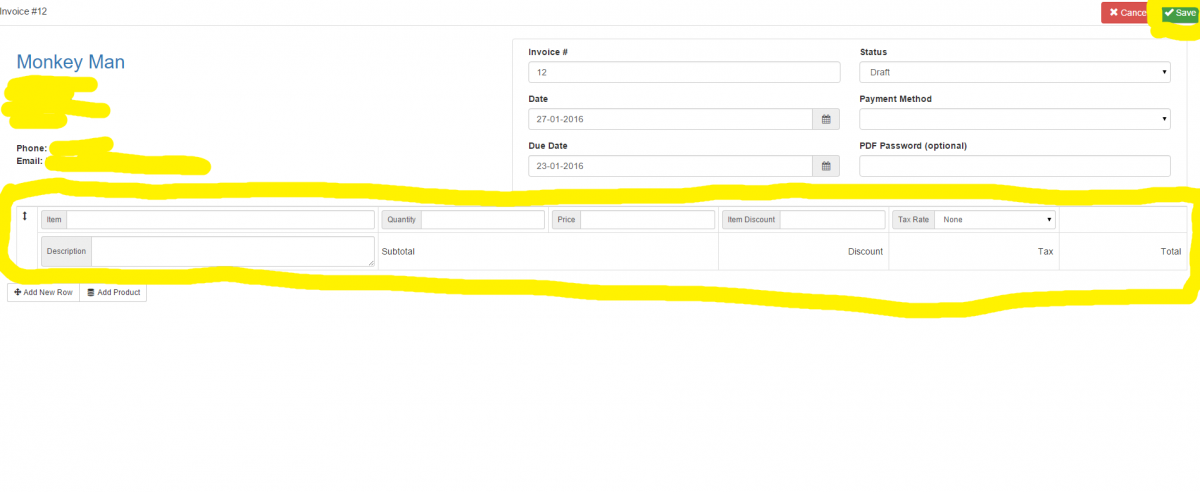
Hi everyone Im having a nightmare with javascript again grrrr, I'm just not great with javascript / jquery so basically I have a table with inputs to create an invoice, the reason im using javascript to post the form is because i have to allow for infinite items to be added into the database using json stringify as an array, the problem I have is im trying to force that atleast 1 item be added to the table before posting the data. I am using bootstrap and this hasn't been a problem for all of my other forms because i can just add required to the input but because i have to do this one differently using an a href button This form just wont validate (but it will post the data to the php script) so here is my code: Table with inputs: <tbody style="" class="item ui-sortable-handle"> <tr> <td rowspan="2" class="td-icon"> <i class="glyphicon glyphicon-resize-vertical cursor-move"></i> </td> <td class="td-text"> <input type="hidden" name="invoice_id" value="<?php echo $invoiceNo;?>"> <input type="hidden" name="item_id" value> <div class="input-group"> <span class="input-group-addon">Item</span> <input type="text" name="item_name" class="input-sm form-control" required> </div> </td> <td class="td-amount td-quantity"> <div class="input-group"> <span class="input-group-addon">Quantity</span> <input type="text" name="item_quantity" class="input-sm form-control amount"> </div> </td> <td class="td-amount"> <div class="input-group"> <span class="input-group-addon">Price</span> <input type="text" name="item_price" class="input-sm form-control amount"> </div> </td> <td class="td-amount"> <div class="input-group"> <span class="input-group-addon">Item Discount</span> <input type="text" name="item_discount_amount" class="input-sm form-control amount" data-toggle="tooltip" data-placement="bottom" title data-original-title="£ Per Item"> </div> </td> <td class="td-amount"> <div class="input-group"> <span class="input-group-addon">Tax Rate</span> <select name="item_tax_rate_id" class="form-control input-sm"> <?php //this section may update based upon selections but for now We have none echo "<option value='0'>None</option>"; ?> </select> </div> </td> <td class="td-icon text-right td-vert-middle"></td> </tr> <tr> <td class="td-textarea"> <div class="input-group"> <span class="input-group-addon">Description</span> <textarea name="item_description" class="input-sm form-control"></textarea> </div> </td> <td colspan="2" class="td-admount td-vert-middle"> <span>Subtotal</span> <br> <span name="subtotal" class="amount"></span> </td> <td class="td-amount td-vert-middle"> <span>Discount</span> <br> <span name="item_discount_total" class="amount"></span> </td> <td class="td-amount td-vert-middle"> <span>Tax</span> <br> <span name="item_tax_total" class="amount"></span> </td> <td class="td-amount td-vert-middle"> <span>Total</span> <br> <span name="item_total" class="amount"></span> </td> </tr> </tbody> </table> </form> </div> </div> <!-- End of items Tables--> The Save button at the top of the page before the table: <a href="#" class="btn btn-success ajax-loader" id="btn_save_invoice"> And lastly my attempt at the javascript / jquery / ajax: <script type="text/javascript"> $('#btn_save_invoice').click(function () { $('#item_form').validate({ rules: { item_name:{ required: true, message: 'This is required' } }, }); var items = []; var item_order = 1; $('table tbody.item').each(function () { var row = {}; $(this).find('input,select,textarea').each(function () { if ($(this).is(':checkbox')) { row[$(this).attr('name')] = $(this).is(':checked'); } else { row[$(this).attr('name')] = $(this).val(); } }); row['item_order'] = item_order; item_order++; items.push(row); }); $.post("<?php echo url()."Clients/invoice_ajax.php"; ?>", { invoice_id: <?php echo $invoice_id; ?>, invoice_number: $('#invoice_number').val(), invoice_date_created: $('#invoice_date_created').val(), invoice_date_due: $('#invoice_date_due').val(), invoice_status_id: $('#invoice_status_id').val(), invoice_password: $('#invoice_password').val(), items: JSON.stringify(items), invoice_discount_amount: $('#invoice_discount_amount').val(), invoice_discount_percent: $('#invoice_discount_percent').val(), invoice_terms: $('#invoice_terms').val(), custom: $('input[name^=custom]').serializeArray(), payment_method: $('#payment_method').val() }, function (data) { var response = JSON.parse(data); if (response.success == '1') { window.location = "<?php echo url()."Clients/invoice_ajax.php"; ?>/" + <?php echo $invoice_id; ?>; } else { $('#fullpage-loader').hide(); $('.control-group').removeClass('has-error'); $('div.alert[class*="alert-"]').remove(); var resp_errors = response.validation_errors, all_resp_errors = ''; for (var key in resp_errors) { $('#' + key).parent().addClass('has-error'); all_resp_errors += resp_errors[key]; } $('#invoice_form').prepend('<div class="alert alert-danger">' + all_resp_errors + '</div>'); } }); }); </script> Please bare in mind the actual posting section of the form Works perfectly! the only issue is the inputs will not validate before post. here is what the page looks like (i have highlighted the parts that I am referring to in the post: I really am thankful for all the help i get, a huge thank you in advance to anyone who helps with this.
-
Hi all, I am trying to pass 4 variables from one php page to another php page containing a google maps api. The variables I am passing are geo coordinates. at the end I want to show the map on my php page however I am struggling with linking php and javascipt together. This is what I have so far: external function page: http://pastebin.com/NAKHmKxW [PART OF MAIN PHP PAGE] <div class="row"> <?php include_once("function_maps.php"); initMap($latitude, $longitude,$row['Latitude'],$row['Longitude']); ?> </div>
-
 Hey guys, i am trying to create a box to show images or content once a user selects a link within a gallery. So for example i have an image --> user scrolls over --> image overlay shows a link ---> link actions to a jquery action to where a hidden field shows more data. right now i have everything to the point to where the links default action is disabled and the "overlay" div that will show the content is hidden. when i then go ahead and add some jquery to add a class when the link is clicked nothing seems to happen. <section class="work_area" id="WORK"> <div class="container"> <div class="row"> <div class="col-md-12 text-center"> <div class="work_title wow fadeInUp animated"> <h1>demo<span style="color: #64bdec; font-weight: bolder;">33</span> PORTFOLIO</h1> <img src="images/arrow486.png" alt=""> </div> <div id="dataBox"></div> </div> </div> </div> <div class="container-fluid"> <div class="row"> <div class="col-md-2 no_padding"> <div class="single_image"> <img src="images/REGISTERE.png" alt=""> <div class="image_overlay"> <h2>Lorem ipsum</h4> <a id="link" href="portfolio.php" >Popup link</a> </div> </div> </div> </div> </div> </section> CSS #dataBox{ width: 800px; height: 500px; margin: auto; padding: 100px 100px; position: relative; border: 2px solid black; margin-bottom: 10px; } #pData{ background: red; width: 800px; height: 500px; margin: auto; padding: 100px 100px; position: relative; border: 2px solid black; } JS. $(document).ready(function(){ $('#dataBox').hide(); $('#link').click(function(e){ e.preventDefault(); $('div #dataBox').removeClass().addClass('pData'); console.log("link is working"); }); }); everything works other than the div showing up.
 -
Hi Guys, I have created a calendar view with this plug in. http://fullcalendar.io/ The calendar view will show calendar view by Start Date and End Date. So I have some problem with some of the event, the start date is from 01-January-2015 until 15-Jan-2015, but in between actually there is a break. For example, 01-January-2015 until 03-January-2015 13-January-2015 until 15-January-2015 So, because of the start date and the end date is so long, so in the calendar view, it block the calendar from 01/Jan until 15/Jan. Its look weird. Actually i have actual dates column in my database column in this format: 01-01-2015,02-01-2015,03-01-2015,13-01-2015,14-01-2015,15-01-2015Start Date column 01-01-2015 End Date column 15-01-2015So, i was wondering is there any script to detect each of date to separate the break in between the start date and end date. Thank You
-
links in header looks like.. <link rel="icon" href="images/favicon.ico"> <link rel="shortcut icon" href="images/favicon.ico" /> <link rel="stylesheet" href="css/style.css"> <script src="js/jquery.js"></script> <script src="js/jquery-migrate-1.1.1.js"></script> <script src="js/jquery.easing.1.3.js"></script> <script src="js/script.js"></script> <script src="js/superfish.js"></script> <script src="js/jquery.equalheights.js"></script> <script src="js/jquery.mobilemenu.js"></script> <script src="js/tmStickUp.js"></script> <script src="js/jquery.ui.totop.js"></script> <script src="js/validjs.js"></script> <script src="//code.jquery.com/jquery-1.11.3.min.js"></script> <script src="//code.jquery.com/jquery-migrate-1.2.1.min.js"></script> <link rel="stylesheet" href="css/homestyle.css"> <meta http-equiv="X-UA-Compatible" content="IE=edge"> <link href="css/side-slider.css" rel="stylesheet" type="text/css" media="screen"> <meta http-equiv="X-UA-Compatible" content="IE=edge,chrome=1"> <meta name="viewport" content="width=device-width, initial-scale=1"> <script src="js/jquery.side-slider.js"></script> if i comment the below jq library.. <script src="//code.jquery.com/jquery-1.11.3.min.js"></script> <script src="//code.jquery.com/jquery-migrate-1.2.1.min.js"></script> then my stuck-container works on scroll down the page.. but my "username checker" plugin does not work.. and... VICE-VERSA... Please help me to get out of this prob...
-
Hello I have this Ajax code witch working good, but I'm not really good at javascript I just started 1 month ago, so I'm not sure if this code is perfect or not, or is there any way to improve this AJAX code. HTML/AJAX <input type="text" id="text_1" /> <button name="js_btn_func" id="js_btn_func" onclick="ajax()" > Execute JavaScript / AJAX Function </button> <div id="success_2"></div> <div id="result_2"></div> <div id="error_2"></div> <script> try { var results_area_2 = document.getElementById("result_2"); var error_area_2 = document.getElementById("error_2"); var success_area_2 = document.getElementById("success_2"); function ajax(str) { var xhttp; var str = document.getElementById("text_1").value; if (str == "") { document.getElementById("result_2").innerHTML = ""; return; } xhttp = new XMLHttpRequest(); xhttp.onreadystatechange = function() { if (xhttp.readyState == 4 && xhttp.status == 200) { results_area_2.innerHTML = xhttp.responseText; success_area_2.innerHTML = ('Success: Script is <b>ON</b>'); } } xhttp.open("POST", "action.php?name="+str, true); xhttp.send(); } } catch(e){ alert('An error has occurred: '+e.message) error_area_2.innerHTML = ('Error: Script is <b>OFF</b>'); } </script> PHP <?php $random_query = mt_rand(1, 9999); if (isset($_REQUEST["name"])){ $q = $_REQUEST["name"]; echo "Hello <b>$q</b>! random number : $random_query "; } ?> Thanks in advance.
-
Limit selection of check box My code looks like... foreach($res as $res) echo '<div class="ediv"><input type="checkbox" class="echeck" name="pr[]" value="'.trim($res['product']).'"/>'.trim($res['product']).'</div>'; How to set limit of selection of dynamically created checkboxes...??
-
Hello sorry if the English is not good Is there any way to get client's timezone or hours difference using PHP and JAVASCRIPT so the time is displayed based on the client's timezone, because I've created a small PHP script and when I upload it to the server, the time was displayed based on the server's timezone. Thank's in advance, Have a good day.
-
I have this js code that works great. Now the new option I would like to add is the "days". Right now it's only based on hours, mins, seconds. Can you show me how you would add the "days" option to it? function Timer(container, timeLeft) { // get hour, minute and second element using jQuery selector var hoursContainer = $(container).find('.hour'); var minsContainer = $(container).find('.min'); var secsContainer = $(container).find('.sec'); // hold time left var currentTimeLeft = timeLeft; // 1 second = 1000 ms var secondsForTimer = 1000; // hold ID value return by setInterval() var timerInterval; // call setInteval() only when timeLeft is greater than 0 if (currentTimeLeft == 0) { return; } else { //Call setInterval()function and store ID value to timerInterval. timerInterval = setInterval(countdown, secondsForTimer); } //function being passed to setInterval() function countdown() { currentTimeLeft = parseInt(currentTimeLeft - secondsForTimer); if (currentTimeLeft == 0) { //stop calling countdown function by calling clearInterval() clearInterval(timerInterval); return; } else { //calculate hours left var wholeSeconds = parseInt(currentTimeLeft / 1000,10); var wholeMinutes = parseInt(currentTimeLeft / 60000,10); var wholeHours = parseInt(wholeMinutes / 60,10); //calculate minutes left var minutes = parseInt(wholeMinutes % 60,10); //calculate seconds left var seconds = parseInt(wholeSeconds % 60,10); //prefix 0 to hour, min and second counter $(hoursContainer).text((wholeHours < 10 ? "0" : "") + wholeHours + (wholeHours <=0 ? " hr" : " hrs")); $(minsContainer).text((minutes < 10 ? "0" : "") + minutes + (minutes <=0 ? " min" : " mins")); $(secsContainer).text((seconds < 10 ? "0" : "") + seconds + (seconds <=0 ? " sec" : " secs")); } } } Thanks.
-
Hi guys, i have a table with 6 COLS and 12 ROWS. In the first column is a filed with dimensions (4 ml) and in the other 5 columns are the prices with are different one from another. What i like to do is when i click on a cell from the table to autocomplete bellow 2 inputs 1 with dimension and another with the price from that cell. I've manage to do the first part but the secound one i don't know how to do. Please have a look at my code below. (function () { if (window.addEventListener) { window.addEventListener('load', run, false); } else if (window.attachEvent) { window.attachEvent('onclick', run); } function run() { var t = document.getElementById('myTable'); t.onclick = function (event) { event = event || window.event; //IE8 var target = event.target || event.srcElement; while (target && target.nodeName != 'TR') { // find TR target = target.parentElement; } //if (!target) { return; } //tr should be always found //var cells = target.cells; //cell collection - https://developer.mozilla.org/en-US/docs/Web/API/HTMLTableRowElement var cells = target.getElementsByTagName('td'); //alternative var f1 = document.getElementById('Inaltime / Dimensiune'); var f2 = document.getElementById('Ø 14'); var f3 = document.getElementById('Ø 16'); var f4 = document.getElementById('Ø 18'); var f5 = document.getElementById('Ø 20'); var f6 = document.getElementById('Ø 25'); f1.value = cells[0].innerHTML; f2.value = cells[1].innerHTML; f3.value = cells[2].innerHTML; f4.value = cells[3].innerHTML; f5.value = cells[4].innerHTML; f6.value = cells[5].innerHTML; //console.log(target.nodeName, event); }; } })(); <table id="myTable" class="demo"> <caption> <h3>Sisteme de cosuri fum TONA <span class="orange-price">- 15% REDUCERE</span></h3></caption> <thead> <tr> <th> Inaltime / Dimensiune </th> <th>Ø 14</th> <th>Ø 16</th> <th>Ø 18</th> <th>Ø 20</th> <th>Ø 25</th> </tr> </thead> <tbody> <tr> <td>5 ml <br> </td> <td><span class="old-price">583 EUR</span> <br> <span class="orange-price">496 EUR</span> </td> <td><span class="old-price">630 EUR</span> <br> <span class="orange-price">536 EUR</span> </td> <td><span class="old-price">661 EUR</span> <br> <span class="orange-price">562 EUR</span> </td> <td><span class="old-price">704 EUR</span> <br> <span class="orange-price">598 EUR</span> </td> <td><span class="old-price">1125 EUR</span> <br> <span class="orange-price">956 EUR</span> </td> </tr> <tr> <td>5.5 ml</td> <td><span class="old-price">608 EUR</span> <br> <span class="orange-price">517 EUR</span> </td> <td><span class="old-price">659 EUR</span> <br> <span class="orange-price">560 EUR</span> </td> <td><span class="old-price">692 EUR</span> <br> <span class="orange-price">588 EUR</span> </td> <td><span class="old-price">737 EUR</span> <br> <span class="orange-price">626 EUR</span> </td> <td><span class="old-price">1187 EUR</span> <br> <span class="orange-price">1009 EUR</span> </td> </tr> <tr> <td>6 ml</td> <td><span class="old-price">634 EUR</span> <br> <span class="orange-price">539 EUR</span> </td> <td><span class="old-price">687 EUR</span> <br> <span class="orange-price">584 EUR</span> </td> <td><span class="old-price">722 EUR</span> <br> <span class="orange-price">614 EUR</span> </td> <td><span class="old-price">770 EUR</span> <br> <span class="orange-price">655 EUR</span> </td> <td><span class="old-price">1250 EUR</span> <br> <span class="orange-price">1063 EUR</span> </td> </tr> <tr> <td>6.5 ml</td> <td><span class="old-price">659 EUR</span> <br> <span class="orange-price">560 EUR</span> </td> <td><span class="old-price">716 EUR</span> <br> <span class="orange-price">609 EUR</span> </td> <td><span class="old-price">752 EUR</span> <br> <span class="orange-price">639 EUR</span> </td> <td><span class="old-price">803 EUR</span> <br> <span class="orange-price">683 EUR</span> </td> <td><span class="old-price">1313 EUR</span> <br> <span class="orange-price">1117 EUR</span> </td> </tr> <tr> <td>7 ml</td> <td><span class="old-price">685 EUR</span> <br> <span class="orange-price">582 EUR</span> </td> <td><span class="old-price">745 EUR</span> <br> <span class="orange-price">633 EUR</span> </td> <td><span class="old-price">782 EUR</span> <br> <span class="orange-price">665 EUR</span> </td> <td><span class="old-price">836 EUR</span> <br> <span class="orange-price">711 EUR</span> </td> <td><span class="old-price">1375 EUR</span> <br> <span class="orange-price">1169 EUR</span> </td> </tr> <tr> <td>7.5 ml</td> <td><span class="old-price">710 EUR</span> <br> <span class="orange-price">604 EUR</span> </td> <td><span class="old-price">774 EUR</span> <br> <span class="orange-price">660 EUR</span> </td> <td><span class="old-price">812 EUR</span> <br> <span class="orange-price">690 EUR</span> </td> <td><span class="old-price">869 EUR</span> <br> <span class="orange-price">739 EUR</span> </td> <td><span class="old-price">1438 EUR</span> <br> <span class="orange-price">1222 EUR</span> </td> </tr> <tr> <td>8 ml</td> <td><span class="old-price">735 EUR</span> <br> <span class="orange-price">625 EUR</span> </td> <td><span class="old-price">803 EUR</span> <br> <span class="orange-price">683 EUR</span> </td> <td><span class="old-price">843 EUR</span> <br> <span class="orange-price">717 EUR</span> </td> <td><span class="old-price">902 EUR</span> <br> <span class="orange-price">767 EUR</span> </td> <td><span class="old-price">1500 EUR</span> <br> <span class="orange-price">1275 EUR</span> </td> </tr> <tr> <td>8.5 ml</td> <td><span class="old-price">761 EUR</span> <br> <span class="orange-price">647 EUR</span> </td> <td><span class="old-price">831 EUR</span> <br> <span class="orange-price">706 EUR</span> </td> <td><span class="old-price">873 EUR</span> <br> <span class="orange-price">742 EUR</span> </td> <td><span class="old-price">935 EUR</span> <br> <span class="orange-price">795 EUR</span> </td> <td><span class="old-price">1563 EUR</span> <br> <span class="orange-price">1329 EUR</span> </td> </tr> <tr> <td>9 ml</td> <td><span class="old-price">802 EUR</span> <br> <span class="orange-price">682 EUR</span> </td> <td><span class="old-price">876 EUR</span> <br> <span class="orange-price">745 EUR</span> </td> <td><span class="old-price">919 EUR</span> <br> <span class="orange-price">781 EUR</span> </td> <td><span class="old-price">984 EUR</span> <br> <span class="orange-price">836 EUR</span> </td> <td><span class="old-price">1642 EUR</span> <br> <span class="orange-price">1396 EUR</span> </td> </tr> <tr> <td>9.5 ml</td> <td><span class="old-price">827 EUR</span> <br> <span class="orange-price">703 EUR</span> </td> <td><span class="old-price">905 EUR</span> <br> <span class="orange-price">769 EUR</span> </td> <td><span class="old-price">949 EUR</span> <br> <span class="orange-price">807 EUR</span> </td> <td><span class="old-price">1017 EUR</span> <br> <span class="orange-price">864 EUR</span> </td> <td><span class="old-price">1704 EUR</span> <br> <span class="orange-price">1448 EUR</span> </td> </tr> <tr> <td>10 ml</td> <td><span class="old-price">853 EUR</span> <br> <span class="orange-price">725 EUR</span> </td> <td><span class="old-price">934 EUR</span> <br> <span class="orange-price">794 EUR</span> </td> <td><span class="old-price">979 EUR</span> <br> <span class="orange-price">832 EUR</span> </td> <td><span class="old-price">1050 EUR</span> <br> <span class="orange-price">893 EUR</span> </td> <td><span class="old-price">1767 EUR</span> <br> <span class="orange-price">1502 EUR</span> </td> </tr> <tbody> </table>
-
im trying to load tinymce dynamically in my script when the edit button is clicked but its not loading. please help with simple and working example as im new to javascript. code for tinymce : tinymce.init({ menubar:false, selector: "textarea#wall_edit_1", theme: "modern", resize: false, height: 200, plugins: [ " autolink link image preview hr anchor pagebreak spellchecker", "searchreplace wordcount visualblocks visualchars insertdatetime media nonbreaking", "save table contextmenu directionality emoticons paste textcolor" ], content_css: "css/content.css", toolbar: "insertfile undo redo | styleselect | bold italic | alignleft aligncenter alignright alignjustify | bullist numlist outdent indent | l ink image | print preview media fullpage | forecolor backcolor emoticons", style_formats: [ {title: 'Bold text', inline: 'b'}, {title: 'Red text', inline: 'span', styles: {color: '#ff0000'}}, {title: 'Red header', block: 'h1', styles: {color: '#ff0000'}}, {title: 'Example 1', inline: 'span', classes: 'example1'}, {title: 'Example 2', inline: 'span', classes: 'example2'}, {title: 'Table styles'}, {title: 'Table row 1', selector: 'tr', classes: 'tablerow1'} ] }); jquery code in home page to show the editor dynamically: $(".session_edit").hide(); $(".friend_edit").hide(); $(".hidden_text_edit").click(function(){ var id=$(this).attr("type"); $(".hidden_edit_4_session"+id).show(); var hide_status=$(".statusboxes").attr('type'); var title=$(".title_s_2copy").attr('type'); var data=$(".data_s_2copy").attr('type'); $(hide_status).hide(); tinyMCE.get('.hidden_edit_4_session').setContent(data); $(".title_s_edit").val(title); }); $(".close_edit").click(function(){ $(".hidden_edit_4_session").hide(); var hide_status=$(".statusboxes").attr('div', 'type'); $(hide_status).show(); }); html code that was generated using php which i want to edit: <div class='jumbotron'><input type='text' class='form-control title_s' name='status_title' placeholder='Title ' ><br><textarea id='wall_id_1' class='update_session' placeholder='whats up qwerty'></textarea><button style='float:right;' type='a' class='btn btn-warning btn btn-large btn-lg post-s'>Post</button></div><div attr='7' class='hidden_edit_4_session7 session_edit jumbotron'><a href='#' class='pull-right close_edit' title='Close without editing'>Close X</a><input type='text' class='form-control title_s_edit' name='status_title' value='hello shan!' placeholder='Title' ><div> </div><textarea id='wall_edit_1' class='session_edit 7' placeholder='whats up qwerty'> <p>what's up.</p></textarea><br><button style='float:right;' type='a' class='btn btn-warning btn btn-large btn-lg post-s-edit'>Update</button></div><div id="7" type="7" class="statusboxes jumbotron"><h3 style="color:black; margin-bottom:5px; margin-top:5px;" class="pull-left"><div id="7" class="title_s_2copy" value="hello shan!">hello shan!</div></h3><span class="pull-right"><div class="dropdown"><button type="button" class="btn btn-danger dropdown-toggle" data-toggle="dropdown" ><span class="glyphicon glyphicon-edit"></span></button><ul class="dropdown-menu"><li><a href="#" id="7" type="7" class="edit_4_session hidden_text_edit glyphicon glyphicon-pencil" title="Edit this status" >Edit</a></li><li><a href="#" id="7" class="delete_4_session hidden_text_delete_7 glyphicon glyphicon-trash delete_reply_btn" title="Delete this status and its replies">Remove</a></li></ul></div></span><br><hr><span class="pull-left data_s_2copy" id="7" value="<p>what's up.</p>" style="font-size:9px; margin-bottom:0px; margin-top:0px; text-align:left; color:black;"><p>what's up.</p></span><br><br><hr><b style="text-align:right; color:black;"><small>Posted by:- <a href="search_results.php?u=qwerty">qwerty</a> 2015-10-20 10:13:18</small></b><br><br><textarea id="7" class="status_update input-custom2" placeholder="comment's"></textarea><button id="7" type="b" class="btn btn-warning pull-right btn-sm">Reply</button></div><div attr='6' class='hidden_edit_4_session6 session_edit jumbotron'><a href='#' class='pull-right close_edit' title='Close without editing'>Close X</a><input type='text' class='form-control title_s_edit' name='status_title' value='pen test' placeholder='Title' ><div> </div><textarea id='wall_edit_1' class='session_edit 6' placeholder='whats up qwerty'> <p><script type="text/javascript">alert("hooya hacked")</script></p></textarea><br><button style='float:right;' type='a' class='btn btn-warning btn btn-large btn-lg post-s-edit'>Update</button></div><div id="6" type="6" class="statusboxes jumbotron"><h3 style="color:black; margin-bottom:5px; margin-top:5px;" class="pull-left"><div id="6" class="title_s_2copy" value="pen test">pen test</div></h3><span class="pull-right"><div class="dropdown"><button type="button" class="btn btn-danger dropdown-toggle" data-toggle="dropdown" ><span class="glyphicon glyphicon-edit"></span></button><ul class="dropdown-menu"><li><a href="#" id="6" type="6" class="edit_4_session hidden_text_edit glyphicon glyphicon-pencil" title="Edit this status" >Edit</a></li><li><a href="#" id="6" class="delete_4_session hidden_text_delete_6 glyphicon glyphicon-trash delete_reply_btn" title="Delete this status and its replies">Remove</a></li></ul></div></span><br><hr><span class="pull-left data_s_2copy" id="6" value="<p><script type="text/javascript">alert("hooya hacked")</script></p>" style="font-size:9px; margin-bottom:0px; margin-top:0px; text-align:left; color:black;"><p><script type="text/javascript">alert("hooya hacked")</script></p></span><br><br><hr><b style="text-align:right; color:black;"><small>Posted by:- <a href="search_results.php?u=qwerty">qwerty</a> 2015-10-18 21:53:31</small></b><br><br><textarea id="6" class="status_update input-custom2" placeholder="comment's"></textarea><button id="6" type="b" class="btn btn-warning pull-right btn-sm">Reply</button></div><div attr='5' class='hidden_edit_4_session5 session_edit jumbotron'><a href='#' class='pull-right close_edit' title='Close without editing'>Close X</a><input type='text' class='form-control title_s_edit' name='status_title' value='pen test' placeholder='Title' ><div> </div><textarea id='wall_edit_1' class='session_edit 5' placeholder='whats up qwerty'> <p><script type="text/javascript">alert("hooya hacked")</script></p></textarea><br><button style='float:right;' type='a' class='btn btn-warning btn btn-large btn-lg post-s-edit'>Update</button></div><div id="5" type="5" class="statusboxes jumbotron"><h3 style="color:black; margin-bottom:5px; margin-top:5px;" class="pull-left"><div id="5" class="title_s_2copy" value="pen test">pen test</div></h3><span class="pull-right"><div class="dropdown"><button type="button" class="btn btn-danger dropdown-toggle" data-toggle="dropdown" ><span class="glyphicon glyphicon-edit"></span></button><ul class="dropdown-menu"><li><a href="#" id="5" type="5" class="edit_4_session hidden_text_edit glyphicon glyphicon-pencil" title="Edit this status" >Edit</a></li><li><a href="#" id="5" class="delete_4_session hidden_text_delete_5 glyphicon glyphicon-trash delete_reply_btn" title="Delete this status and its replies">Remove</a></li></ul></div></span><br><hr><span class="pull-left data_s_2copy" id="5" value="<p><script type="text/javascript">alert("hooya hacked")</script></p>" style="font-size:9px; margin-bottom:0px; margin-top:0px; text-align:left; color:black;"><p><script type="text/javascript">alert("hooya hacked")</script></p></span><br><br><hr><b style="text-align:right; color:black;"><small>Posted by:- <a href="search_results.php?u=qwerty">qwerty</a> 2015-10-18 21:53:30</small></b><br><br><textarea id="5" class="status_update input-custom2" placeholder="comment's"></textarea><button id="5" type="b" class="btn btn-warning pull-right btn-sm">Reply</button></div><div attr='3' class='hidden_edit_4_session3 session_edit jumbotron'><a href='#' class='pull-right close_edit' title='Close without editing'>Close X</a><input type='text' class='form-control title_s_edit' name='status_title' value='this is not working' placeholder='Title' ><div> </div><textarea id='wall_edit_1' class='session_edit 3' placeholder='whats up qwerty'> <p>wht to do???</p></textarea><br><button style='float:right;' type='a' class='btn btn-warning btn btn-large btn-lg post-s-edit'>Update</button></div><div id="3" type="3" class="statusboxes jumbotron"><h3 style="color:black; margin-bottom:5px; margin-top:5px;" class="pull-left"><div id="3" class="title_s_2copy" value="this is not working">this is not working</div></h3><span class="pull-right"><div class="dropdown"><button type="button" class="btn btn-danger dropdown-toggle" data-toggle="dropdown" ><span class="glyphicon glyphicon-edit"></span></button><ul class="dropdown-menu"><li><a href="#" id="3" type="3" class="edit_4_session hidden_text_edit glyphicon glyphicon-pencil" title="Edit this status" >Edit</a></li><li><a href="#" id="3" class="delete_4_session hidden_text_delete_3 glyphicon glyphicon-trash delete_reply_btn" title="Delete this status and its replies">Remove</a></li></ul></div></span><br><hr><span class="pull-left data_s_2copy" id="3" value="<p>wht to do???</p>" style="font-size:9px; margin-bottom:0px; margin-top:0px; text-align:left; color:black;"><p>wht to do???</p></span><br><br><hr><b style="text-align:right; color:black;"><small>Posted by:- <a href="search_results.php?u=qwerty">qwerty</a> 2015-10-17 19:32:35</small></b><br><br><textarea id="3" class="status_update input-custom2" placeholder="comment's"></textarea><button id="3" type="b" class="btn btn-warning pull-right btn-sm">Reply</button></div><div attr='2' class='hidden_edit_4_session2 session_edit jumbotron'><a href='#' class='pull-right close_edit' title='Close without editing'>Close X</a><input type='text' class='form-control title_s_edit' name='status_title' value='im grateful to mother nature and god' placeholder='Title' ><div> </div><textarea id='wall_edit_1' class='session_edit 2' placeholder='whats up qwerty'> <p>as the title says im grateful</p></textarea><br><button style='float:right;' type='a' class='btn btn-warning btn btn-large btn-lg post-s-edit'>Update</button></div><div id="2" type="2" class="statusboxes jumbotron"><h3 style="color:black; margin-bottom:5px; margin-top:5px;" class="pull-left"><div id="2" class="title_s_2copy" value="im grateful to mother nature and god">im grateful to mother nature and god</div></h3><span class="pull-right"><div class="dropdown"><button type="button" class="btn btn-danger dropdown-toggle" data-toggle="dropdown" ><span class="glyphicon glyphicon-edit"></span></button><ul class="dropdown-menu"><li><a href="#" id="2" type="2" class="edit_4_session hidden_text_edit glyphicon glyphicon-pencil" title="Edit this status" >Edit</a></li><li><a href="#" id="2" class="delete_4_session hidden_text_delete_2 glyphicon glyphicon-trash delete_reply_btn" title="Delete this status and its replies">Remove</a></li></ul></div></span><br><hr><span class="pull-left data_s_2copy" id="2" value="<p>as the title says im grateful</p>" style="font-size:9px; margin-bottom:0px; margin-top:0px; text-align:left; color:black;"><p>as the title says im grateful</p></span><br><br><hr><b style="text-align:right; color:black;"><small>Posted by:- <a href="search_results.php?u=qwerty">qwerty</a> 2015-10-17 19:29:15</small></b><br><br><textarea id="2" class="status_update input-custom2" placeholder="comment's"></textarea><button id="2" type="b" class="btn btn-warning pull-right btn-sm">Reply</button></div><div attr='1' class='hidden_edit_4_session1 session_edit jumbotron'><a href='#' class='pull-right close_edit' title='Close without editing'>Close X</a><input type='text' class='form-control title_s_edit' name='status_title' value='hello world' placeholder='Title' ><div> </div><textarea id='wall_edit_1' class='session_edit 1' placeholder='whats up qwerty'> <p>this is my 1st post</p></textarea><br><button style='float:right;' type='a' class='btn btn-warning btn btn-large btn-lg post-s-edit'>Update</button></div><div id="1" type="1" class="statusboxes jumbotron"><h3 style="color:black; margin-bottom:5px; margin-top:5px;" class="pull-left"><div id="1" class="title_s_2copy" value="hello world">hello world</div></h3><span class="pull-right"><div class="dropdown"><button type="button" class="btn btn-danger dropdown-toggle" data-toggle="dropdown" ><span class="glyphicon glyphicon-edit"></span></button><ul class="dropdown-menu"><li><a href="#" id="1" type="1" class="edit_4_session hidden_text_edit glyphicon glyphicon-pencil" title="Edit this status" >Edit</a></li><li><a href="#" id="1" class="delete_4_session hidden_text_delete_1 glyphicon glyphicon-trash delete_reply_btn" title="Delete this status and its replies">Remove</a></li></ul></div></span><br><hr><span class="pull-left data_s_2copy" id="1" value="<p>this is my 1st post</p>" style="font-size:9px; margin-bottom:0px; margin-top:0px; text-align:left; color:black;"><p>this is my 1st post</p></span><br><br><hr><b style="text-align:right; color:black;"><small>Posted by:- <a href="search_results.php?u=qwerty">qwerty</a> 2015-10-17 19:25:09</small></b><br><br><textarea id="1" class="status_update input-custom2" placeholder="comment's"></textarea><button id="1" type="b" class="btn btn-warning pull-right btn-sm">Reply</button></div> </div>
-
 hi guys im trying to hide a specific class selector in jquery. where the id and the type attributes are generated dynamically. but dont know how to select and hide it so, as to do a ajax call. can anyone help. here is the code for the jquery: $(".hidden_text_area").click(function(){ $(".hidden_edit_4_session").show(); var hide_status=$(".statusboxes").attr('type'); $(hide_status).find(".statusboxes").hide(); }); and here is the code where the type attribute is which i want to select and hide if the user clicks edit button. $status_list='<fieldset><div class="jumbotron"><div id="'.$updateid.'" type="'.$updateid.'" class="statusboxes">' . '<h3 style="text-align:left; color:black;" class="pull-left">'.$title.'</h3>' . '<span class="pull-right">' . '<div class="dropdown">' . '<button type="button" class="btn btn-danger dropdown-toggle" data-toggle="dropdown" >' . '<span class="glyphicon glyphicon-edit"></span></button>' . '<ul class="dropdown-menu">' . '<li><a href="#" class="hidden_text_area glyphicon glyphicon-pencil" title="Edit this status" >Edit</a></li>'.$statusdeletebutton.'</ul></div></span><br><hr><span class="pull-left"style="font-size:14px; text-align:left; color:black;"><legend>' . $data.'</legend></span><br><b style="text-align:right; color:black;"><small>Posted by:- <a href="search_results.php?u='.$author.'">'.$author. '</a> '.$post_date.'</small></b>' . '<br>'.$status_replies . '</div></div>'.$statusui_edit ;
 -
 <!DOCTYPE html> <!-- To change this license header, choose License Headers in Project Properties. To change this template file, choose Tools | Templates and open the template in the editor. --> <html> <script src="https://code.jquery.com/jquery-1.10.2.js"></script> <div id="txtHint"></div> <script> function showUser(str) { // alert (str); if (str == "") { document.getElementById("txtHint").innerHTML = ""; return; } else { if (window.XMLHttpRequest) { // code for IE7+, Firefox, Chrome, Opera, Safari xmlhttp = new XMLHttpRequest(); } else { // code for IE6, IE5 xmlhttp = new ActiveXObject("Microsoft.XMLHTTP"); } xmlhttp.onreadystatechange = function () { if (xmlhttp.readyState == 4 && xmlhttp.status == 200) { document.getElementById("txtHint").innerHTML = xmlhttp.responseText; } } xmlhttp.open("GET", "new.php?q=" + str, true); xmlhttp.send(); } } </script> <body> <form> <select onchange="showUser(this.value)"> <option value="1" > 1 </option> <option value="3" > 3 </option> </select> <?php $con = mysqli_connect("localhost", "root", ""); mysqli_select_db($con, "crud_tutorial"); if (isset($_REQUEST['q'])) { $q = intval($_GET['q']); //echo "$q"; $sql = "SELECT * FROM customers WHERE id = '" . $q . "'"; $result = mysqli_query($con, $sql); } else { $sql = "SELECT * FROM customers "; $result = mysqli_query($con, $sql); } echo "<table> <tr> <th>id</th> <th>name</th> </tr>"; while ($row = mysqli_fetch_array($result)) { echo "<tr>"; echo "<td>" . $row['id'] . "</td>"; echo "<td>" . $row['name'] . "</td>"; echo "</tr>"; } echo "</table>"; mysqli_close($con); ?> </form> </body> </html>
 -
I am retriving records from mysql database that has expiry time limit. The time in the database is saved in "minutes". So for one hour, it'll be "3600" minutes. That's all fine. Now what I am trying to do is create a countdown clock using Javascript/jquery and I have ran into a bit of a problem. 1. I am retriving multiple records from the database that all have a countdown timer. Currently, it's only taking the time value of the first record and using that for all the records. I would like to know how I can make it so that each record will have it's own countdown timer value? 2. Everytime I refresh a page, it will reset the timer. How can I fix this? Here's my code. <?php foreach($rows as $row) { $get_expiry_time = $row['expiry_time']; <div class="record"> <div class="timer"> </div> </div> } ?> <script> $(document).ready(function(){ var countDownTime = <?php echo $get_expiry_time; ?>; function countDownTimer() { var hours = parseInt( countDownTime / 3600 ) % 24; var minutes = parseInt( countDownTime / 60 ) % 60; var seconds = countDownTime % 60; var result = (hours < 10 ? "0" + hours : hours) + ":" + (minutes < 10 ? "0" + minutes : minutes) + ":" + (seconds < 10 ? "0" + seconds : seconds); $('.timer').html(result); if(countDownTime == 0 ){ countDownTime = 60*60*60; } countDownTime = countDownTime - 1; setTimeout(function(){ countDownTimer() }, 1000); } countDownTimer(); }); </script>
-
<script type="text/javascript" language="javascript"> function disableFunc() { document.getElementById("groupselect").disabled = true; } </script> <form method="post" class="subform" action="<?php echo htmlentities($_SERVER['PHP_SELF']);?>"> <div class="row" style="background: skyblue; margin-top:-23px"> <div class="col-sm-2"> <div class="input-group"> <select id="groupselect" class="form-control" name="groupid" onchange="disableFunc()"> <option name="0"<?php echo ($_POST['groupid'] == '0') ? ' selected="selected"' : ''; ?> value="0" >GROUP</option> <option name="1"<?php echo ($_POST['groupid'] == '1') ? ' selected="selected"' : ''; ?> value="1" >1</option> <option name="2"<?php echo ($_POST['groupid'] == '2') ? ' selected="selected"' : ''; ?> value="2" >2</option> <option name="3"<?php echo ($_POST['groupid'] == '3') ? ' selected="selected"' : ''; ?> value="3" >3</option> <option name="4"<?php echo ($_POST['groupid'] == '4') ? ' selected="selected"' : ''; ?> value="4" >4</option> <option name="5"<?php echo ($_POST['groupid'] == '5') ? ' selected="selected"' : ''; ?> value="5" >5</option> <option name="6"<?php echo ($_POST['groupid'] == '6') ? ' selected="selected"' : ''; ?> value="6" >6</option> The onchange function works as it shld. My problem is the HTML. I got this select box code from another forum. Without the onchange event in the code, when the user selects a Groupid option, it automatically loads another select box with names. But with it in the code (as I've shown it here), the select box gets disabled immediately causing no names to be loaded in the other select box. I need to be able to load the other select box with names before the groupid select box disables. Any help on this is appreciated. Thanks.
-
Hey guys, I am looking for someone who can design an audio player that can also play a playlist for a website. The player I am looking for needs certain details. 1) Needs to hide src of file 2) Needs to have controls including attractive progress bar 3) Needs to read from mysql database. I am a bit of a programmer myself so I will be tweaking it but the skeleton must be there. Obviously willing to pay for your time please contact back.
-
I have 3 variables coming from 3 columns from a table. I want to insert these variables into 3 columns in a different table. Variables are name, cover, and pageno. The issue is I can see the values in the hidden inputs this is when the page loads when nothing is selected in the combobox??? If I select book number two the same values are in the hidden inputs. If I select book one this is what I see because when the page loads it populates the values as book 1. <input type="hidden" name="cover" value="cover 1"> <input type="hidden" name="pageno" value="pageno 1"> If I select book two this is what I see. <input type="hidden" name="cover" value="cover 1"> <input type="hidden" name="pageno" value="pageno 1"> Make sense? If not, no matter which book I select I see the same values. Here's the code. <select name="name"> <option value="<?php echo "{$_POST['name']}"; ?>"> </option> <?php include('theconnection.php'); $con = mysqli_connect($host,$user,$pass,$dbName); if (!$con) { die('cannot connect: ' . mysqli_error($con)); } mysqli_select_db($con,"thebooks"); $result = mysqli_query($con,"SELECT * FROM books"); $result = mysqli_query($con,"SELECT b.id, b.name, b.cover, b.pageno FROM books"); $cover = ''; $pageno = ''; while($row = mysqli_fetch_array($result)) { echo ("<option value='$row[name]'>$row[name] $row[cover], $row[pageno] </option>"); $cover = "$row[cover]"; $pageno = "$row[pageno]"; } ?> </select> <input type="hidden" name="cover" value="<?php echo $cover; ?>"> <input type="hidden" name="pageno" value="<?php echo $pageno; ?>"> Maybe Javascript will work? I can't figure out how to do this with Javascript either.
-
I'm struggling to produce results to the screen from the following code: HTML: <script src="http://code.jquery.com/jquery-2.1.4.js"></script> <script src="http://code.jquery.com/ui/1.11.4/jquery-ui.js"></script> <script src="../scripts/autocomplete.js"></script> <div> <input type='text' class='search_input' name='search' id='search' placeholder='search' autofocus onkeypress='search_func("http://webfarm.io/subs/homefront/list_articles.php" , "search_output")'> <div id='search_output' class='search_output'></div> </div> Javascript: function search_func( href , target){ var search = $("#search").val(); search = $.trim(search); if(search){ $.ajax({ method: "POST", url: href , data: { search: search } }) .done(function( msg ) { target.innerHTML = msg; // as above, data holds the result of the request, so all the data returned from your results.php file are in this param but please see below; console.log(msg); }); } else { target.innerHTML = ''; } } What am I doing wrong? Why won't it produce the desired results? Sorry if I'm looking like a help vamp, but I'm not trying to be.
-
<input id="numb" type="number" /> <input type="submit" onclick="myFunction()" /> <p id="demo"></p> <script> function myFunction(){ var x = document.getElementById('numb').value; var regex=/^[1-9]+$/; if (x == ""){ document.getElementById('demo').innerHTML = "Input is Missing"; } else if (!x.match(regex)){ document.getElementById('demo').innerHTML = "Input Incorrect"; } else { document.getElementById('demo').innerHTML = "Input OK"; } } /* if (x == "") { document.getElementById('demo').innerHTML = "Input is Missing"; } else if (isNaN(x)) { document.getElementById('demo').innerHTML = "Input Incorrect"; } else { document.getElementById('demo').innerHTML = "Input OK"; } } */ </script> When input type is "text" it works fine. but when i change input type to "number" and then if i type letters or letters plus numbers. it says "input missing" How can i get correct output while using input type "number" ? Please guide. Thankyou.
-
Is there away to get something unique on a client computer? I read about ActiveX but it is only works on IE. I need something that can work on other browsers also, maybe on PHP or on Javascript.
-
<p>Current Images Inside Gallery <br /> <?php foreach($rows as $row): ?> <div class="t"> <table class="table2"> <tr> <td class="table2"><?php echo $row["id"]; ?></td> </tr> <tr> <td><img src="images/<?php echo $row["photo"] ; ?>" alt="" width="130" height="130" /></td> </tr> <tr> <td><textarea class="js-copyfilename" readonly="readonly" ><?php echo $row["photo"];?></textarea> <button class="js-copyfilenamebtn">Copy Filname</button> </td> </tr> </table> </div> <?php endforeach;?> </div> <script type="text/javascript"> var copyfilenameBtn = document.querySelector('.js-copyfilenamebtn'); copyfilenameBtn.addEventListener('click', function(event) { var copyfilename = document.querySelector('.js-copyfilename'); copyfilename.select(); try { var successful = document.execCommand('copy'); var msg = successful ? 'successful' : 'unsuccessful'; console.log('Copying text command was ' + msg); } catch (err) { console.log('Oops, unable to copy'); } }); </script> I am trying to create a button so the user can copy `$filename` then paste it into a field (this part I will code after this is sorted) I have this code which works but it only works for the first row I understand that I will need array the that this is because I would probably need to array the js-copyfilename and js-copyfilenamebtn classes so each one is different but i know very little about JavaScript so would know where to start Thanks in advance
-
I have some routines I use over and over Is there a way to put the error section in a file of its own For example I use a routine below <script type="text/javascript"> $('.MYTRIGGER').live('change', function() { var MyData=''; $("#jq_tab").val('0'); var NameData=$(this).attr('name'); var IdData=$(this).attr('id'); MyData=MyData+'CID='+NameData;; MyData=MyData+'&Field='+IdData; MyData=MyData+'&FieldValue='+$(this).val(); $.ajax( { cache:false, timeout:28000, url : 'MyPhp.php', type : 'post', data : MyData, success : function( resp ) { $("#jq_tab").val('1'); return(false); }, error: function(xhr, status, error) { var stat = $("#jq_tab").val(); $("#main_page_div").unmask_div(); if(stat!='1'){ if (xhr.status === 0) { alert('Unable to connect to Network'); } else if (xhr.status == 404) { alert('Requested page not found. [404]'); } else if (xhr.status == 500) { alert('Internal Server Error [500].'); } else if (exception === 'parsererror') { alert('Requested JSON parse failed.'); } else if (exception === 'timeout') { alert('System Timeout (Internet Congestion or server slow)'); } else if (exception === 'abort') { alert('Ajax request aborted.'); } else { alert('Unspecified Error #' + xhr.responseText); } } return false; } // eof error function }); }); </script> Since the below is common error: function(xhr, status, error) { var stat = $("#jq_tab").val(); $("#main_page_div").unmask_div(); if(stat!='1'){ if (xhr.status === 0) { alert('Unable to connect to Network'); } else if (xhr.status == 404) { alert('Requested page not found. [404]'); } else if (xhr.status == 500) { alert('Internal Server Error [500].'); } else if (exception === 'parsererror') { alert('Requested JSON parse failed.'); } else if (exception === 'timeout') { alert('System Timeout (Internet Congestion or server slow)'); } else if (exception === 'abort') { alert('Ajax request aborted.'); } else { alert('Unspecified Error #' + xhr.responseText); } } return false; } // eof error function Is there a way to store the error function in a common file?
-
Hi all, I am new to PHP and a bit slow in understanding ajax, javascript. I want to ask on how to display the table after I select the 3rd dropdown. I don't know how to start. //this is ajax-dd3.php file <!doctype html public "-//w3c//dtd html 3.2//en"> <html> <head> <title></title> <META NAME="DESCRIPTION" CONTENT=""> <META NAME="KEYWORDS" CONTENT=""> <script type="text/javascript"> function ajaxFunction(choice) { var httpxml; try { // Firefox, Opera 8.0+, Safari httpxml=new XMLHttpRequest(); } catch (e) { // Internet Explorer try { httpxml=new ActiveXObject("Msxml2.XMLHTTP"); } catch (e) { try { httpxml=new ActiveXObject("Microsoft.XMLHTTP"); } catch (e) { alert("Your browser does not support AJAX!"); return false; } } } function stateChanged() { if(httpxml.readyState==4) { //alert(httpxml.responseText); var myObject = JSON.parse(httpxml.responseText); for(j=document.myForm.state.options.length-1;j>=0;j--) { document.myForm.state.remove(j); } var state1=myObject.value.state1; var optn = document.createElement("OPTION"); optn.text = 'Select State'; optn.value = ''; document.myForm.state.options.add(optn); for (i=0;i<myObject.state.length;i++) { var optn = document.createElement("OPTION"); optn.text = myObject.state[i]; optn.value = myObject.state[i]; document.myForm.state.options.add(optn); if(optn.value==state1){ var k= i+1; document.myForm.state.options[k].selected=true; } } ////////////////////////// for(j=document.myForm.city.options.length-1;j>=0;j--) { document.myForm.city.remove(j); } var city1=myObject.value.city1; //alert(city1); for (i=0;i<myObject.city.length;i++) { var optn = document.createElement("OPTION"); optn.text = myObject.city[i]; optn.value = myObject.city[i]; document.myForm.city.options.add(optn); if(optn.value==city1){ document.myForm.city.options[i].selected=true; } } /////////////////////////// document.getElementById("txtHint").style.background='#00f040'; document.getElementById("txtHint").innerHTML='done'; //setTimeout("document.getElementById('txtHint').style.display='none'",3000) } } var url="ajax-dd3ck.php"; var country=myForm.country.value; if(choice != 's1'){ var state=myForm.state.value; var city=myForm.city.value; }else{ var state=''; var city=''; } url=url+"?country="+country; url=url+"&state="+state; url=url+"&city="+city; url=url+"&id="+Math.random(); myForm.st.value=state; //alert(url); document.getElementById("txtHint2").innerHTML=url; httpxml.onreadystatechange=stateChanged; httpxml.open("GET",url,true); httpxml.send(null); document.getElementById("txtHint").innerHTML="Please Wait...."; document.getElementById("txtHint").style.background='#f1f1f1'; } </script> </head> <body > </head> <body> <div id="txtHint" style="width : 100px;background-color: #cccc33;">Message area</div> <br><br> <form name="myForm" action='ajax-dd3-details.php' method='post'"> <input type=hidden name=st value=0> <table width=500> <tr><td > Select Country<br><select name=country id='s1' onchange=ajaxFunction('s1');> <option value=''>Select One</option> <?Php //require "../include/z_db1.php"; require "config.php";// connection to database $sql="select distinct country from student5 "; foreach ($dbo->query($sql) as $row) { echo "<option value=$row[country]>$row[country]</option>"; } ?> </select> </td><td ><select name=state onchange=ajaxFunction('s2');> <option value=''>Select One</option></select></td> <td ><select name=city onchange=ajaxFunction('s3');> <option value=''>Select One</option></select></td> </tr></tr> <tr><td colspan=3><input type=submit value='Submit'></td></tr> </form> </table> <br><br> <div id="txtHint2"></div> </body> </html> //this is ajax-dd3ck.php file <?Php require "config.php"; // connection details error_reporting(0);// With this no error reporting will be there ////////// ///////////////////////////////////////////////////////////////////////////// $country=$_GET['country'];// //$country='IND'; // To check you can use this $state1=$_GET['state']; $city1=$_GET['city']; ///////////// Validate the inputs //////////// // Checking country variable /// if((strlen($country)) > 0 and (!ctype_alpha($country))){ echo "Data Error"; exit; } // Checking state variable (with space ) /// if ((strlen($state1)) > 0 and ctype_alpha(str_replace(' ', '', $state1)) === false) { echo "Data Error"; exit; } /////////// end of input validation ////// if(strlen($country) > 0){ $q_country="select distinct(state) from student5 where country = '$country'"; }else{ $q_country="select distinct(state) from student5"; } //echo $q_country; $sth = $dbo->prepare($q_country); $sth->execute(); $state = $sth->fetchAll(PDO::FETCH_COLUMN); $q_state="select distinct(city) from student5 where "; if(strlen($country) > 0){ $q_state= $q_state . " country = '$country' "; } if(strlen($state1) > 0){$q_state= $q_state . " and state='$state1'";} $sth = $dbo->prepare($q_state); $sth->execute(); $city = $sth->fetchAll(PDO::FETCH_COLUMN); $main = array('state'=>$state,'city'=>$city,'value'=>array("state1"=>"$state1","city1"=>"$city1")); echo json_encode($main); ////////////End of script ///////////////////////////////////////////////////////////////////////////////// ?> //this is ajax-dd3-details.php file <!doctype html public "-//w3c//dtd html 3.2//en"> <html> <head> <title></title> <META NAME="DESCRIPTION" CONTENT=""> <META NAME="KEYWORDS" CONTENT=""> </head> <body> <?Php echo "Country : $_POST[country]<br> State : $_POST[state]<br> City : $_POST[city]<br> <br><br><br> Return to <a href=ajax-dd3.php>Drop down list</a> "; ?> </body> </html>
-
I have tried other players and am now testing the mediaelement.js player, which works in all browsers, playing the video, and shows the 'poster' image in all browsers, except no 'poster' image appears in IE8. As I know the "poster' isn't supported by IE8, I'm looking for help with a work-around to place a thumbnail image as a substitute (for IE8) for the 'poster' image. Any help will be appreciated. Here's my current code: <video id="video" poster="http://www.-domain-.com/img/testImage.jpg" preload="none" controls="controls" width="240" height="220" > <source type="video/mp4" src="http://www.-domain-.com/video/testVideo.mp4"/> <object width="240" height="220" type="application/x-shockwave-flash" data="http://www.-domain-.com/mediaelement/flashmediaelement.swf"> <param name="movie" value="http://www.-domain-.com/mediaelement/flashmediaelement.swf" /> <param name="flashvars" value="controls=true&file=http://www.-domain-.com/video/testVideo.mp4" /> <!-- Image as a last resort --> <img src="http://www.-domain-.com/img/testImage.jpg" width="240" height="220" title="No video playback capabilities" /> </object> </video>